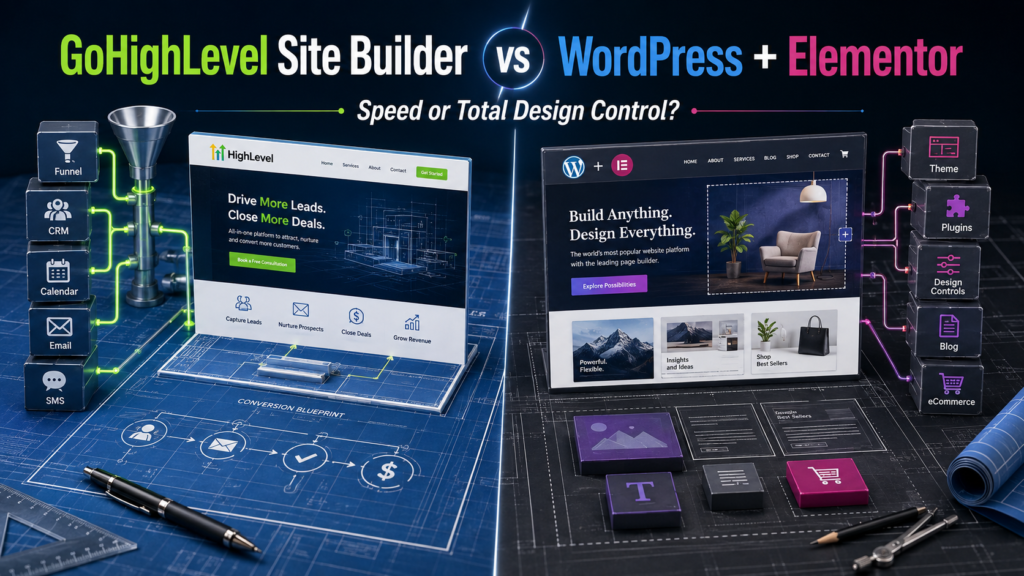
The website launch pathway
GoHighLevel Site Builder vs WordPress Elementor: Speed, SEO, Design, and Ownership Compared
The GoHighLevel site builder vs WordPress Elementor decision is really a choice between two kinds of control. HighLevel gives marketers tighter control over the lead journey. WordPress with Elementor gives site owners deeper control over design, content, extensions, hosting, and long-term portability.
Both can produce professional, mobile-friendly websites without requiring a developer for every edit. However, they solve different problems. HighLevel begins with conversion tools and adds a website builder. Elementor begins with the open WordPress publishing system and adds a flexible visual design layer.
Choose HighLevel when…
The site’s main job is capturing leads, booking appointments, launching funnels, and triggering CRM follow-up with fewer integrations.
Choose WordPress + Elementor when…
The website is a long-term publishing asset requiring detailed design, plugins, ecommerce, custom content structures, and hosting flexibility.
Choose the hybrid setup when…
You want WordPress for the public website while HighLevel handles forms, calendars, CRM records, conversations, and automation.
This is the final spoke in our GoHighLevel software comparisons and alternatives silo. Features and pricing can change, so confirm your requirements with the providers before committing.
The Two Website-Building Philosophies
HighLevel treats a web page as an entry point into a customer journey. A visitor submits a form, starts a chat, books an appointment, completes an order, or enters a funnel. That activity can immediately update the CRM and begin an automated sequence.
WordPress treats a website as an extensible publishing system. Elementor adds a visual editor for pages, templates, headers, footers, archives, popups, forms, and WooCommerce layouts. The result can become a blog, directory, publication, store, membership site, knowledge base, or almost any other web property supported by its theme and plugins.
Short verdict: HighLevel makes the path from click to conversation shorter. WordPress and Elementor make the path from idea to custom website broader.
The Website Launch Pathway
To compare the platforms fairly, follow the work from initial plan to long-term operation. A page that launches quickly but becomes difficult to expand is not necessarily cheaper. A flexible site that takes months to perfect may also fail its business goal.
Stage 1: Planning the Site
HighLevel is easiest to plan when the conversion action is already known: request a quote, book a consultation, register for an event, buy a service, or enter a nurture campaign. Its site and funnel tools share a similar builder structure, making it practical to connect ordinary pages with focused funnel steps.
WordPress and Elementor accommodate more complex content models. A site may require many categories, authors, templates, custom post types, product archives, filtered directories, or multilingual structures. The planning process can be more involved because there are more technical and design choices.
Stage 2: Building the First Version
HighLevel provides templates and a visual builder organized around sections, rows, columns, and elements. Its current tools include desktop and mobile editing as well as AI-assisted website and funnel creation. A marketer can move quickly from a template or generated draft to a functioning lead-capture page.
Elementor also offers drag-and-drop creation, templates, site kits, responsive controls, global styling, containers, and detailed element settings. Elementor Pro adds features such as Theme Builder, forms, popups, dynamic content, custom CSS, marketing widgets, and WooCommerce design tools.
Faster for a straightforward lead-generation site: HighLevel.
More flexible for a custom visual system: Elementor.
Stage 3: Connecting Forms, Calendars, and CRM
This stage exposes HighLevel’s main advantage. Forms, surveys, calendars, chat, contact records, conversations, opportunities, email, text messaging, and workflows belong to the same platform. A form does not merely deliver an email notification; it can create or update a contact, assign an owner, open an opportunity, send an immediate reply, and schedule follow-up.
Elementor Pro includes a form builder and integrations, but WordPress is not a complete CRM by itself. Connecting a WordPress form to HighLevel, HubSpot, an email platform, or another CRM requires an integration, webhook, plugin, or embedded form. This can work extremely well, but each connection becomes something to document and maintain.
Stage 4: Publishing Content for Organic Search
WordPress is the stronger default for a content-heavy organic-search strategy. It has mature handling for posts, pages, authors, categories, tags, media, editorial roles, feeds, archives, revisions, and plugins. SEO plugins such as Rank Math can manage metadata, schema, sitemaps, redirects, and many technical checks.
HighLevel supports websites and blogs with fields for slugs, metadata, canonical links, authors, and categories. Its documentation also covers schema markup and bulk blog imports. This may be sufficient for a local-business site or a smaller publication. However, HighLevel’s blog environment currently has limitations compared with the WordPress ecosystem; its documentation notes, for example, that separate category pages are not yet supported in the described blog workflow and that forms or surveys cannot be inserted directly into blog posts at the time of publication.
Winner for extensive publishing and SEO architecture: WordPress. That does not mean WordPress ranks automatically. Content quality, site performance, crawlability, internal linking, reputation, and satisfying search intent still determine results.
Stage 5: Maintaining the Website
HighLevel reduces the number of separate components. The vendor manages the core platform while users manage domains, pages, content, settings, integrations, deliverability, and account configuration. Fewer moving parts can mean fewer plugin conflicts.
A self-hosted WordPress site requires updates for WordPress core, the theme, Elementor, and other plugins. It also requires hosting, backups, security, caching, and database care. Managed hosting can reduce that workload, but responsibility is distributed across more vendors.
The WordPress tradeoff is freedom. You can change hosts, replace Elementor, add custom development, select different SEO or caching tools, and expand the site in ways a closed builder may not anticipate.
GoHighLevel Site Builder vs WordPress Elementor Feature Matrix
| Requirement | HighLevel Site Builder | WordPress + Elementor |
|---|---|---|
| Visual editing | Section, row, column, and element builder | Detailed visual editor with containers and advanced styling |
| Mobile editing | Desktop and mobile views with device adjustments | Responsive settings, previews, visibility controls, and custom breakpoints |
| CRM | Native contacts, pipelines, conversations, tasks | Requires a plugin or external CRM |
| Funnels and automation | Native funnels, workflows, email, SMS, calendars | Available through Elementor features, WordPress plugins, and integrations |
| Blogging | Built-in blog with SEO settings and import options | Mature publishing, taxonomies, editorial tools, and plugin ecosystem |
| Theme control | Site-level templates and builder styling | Themes plus Elementor Theme Builder for headers, footers, posts, archives, and products |
| Ecommerce | Products, orders, payments, funnels, and offers | WooCommerce ecosystem with Elementor design controls on qualifying plans |
| Extensibility | Native tools, APIs, integrations, custom code | Large theme and plugin ecosystem plus custom PHP, CSS, and JavaScript |
| Hosting choice | Published within the HighLevel environment | Choose and change compatible WordPress hosts |
| Best use | Lead generation, appointments, campaigns, agency deployment | Content sites, custom brands, stores, directories, complex builds |
SEO Control: What Rank Math Scores Do Not Tell You
Rank Math runs inside WordPress, so it naturally favors a WordPress publishing workflow. Its score can help you remember titles, descriptions, headings, internal links, image alt text, keyword placement, and schema. However, reaching a green score does not guarantee rankings, and failing one recommendation does not automatically make a page poor.
HighLevel provides page and blog SEO controls, including metadata, slugs, canonical settings, and schema tools. WordPress typically offers deeper control because SEO plugins, redirects, schema extensions, caching tools, image optimization, database tools, and developer hooks can be selected independently.
For an organic-search site, prioritize these before a plugin score:
- Match the page to a clear search intent.
- Provide original analysis, examples, images, and useful comparisons.
- Create a logical hierarchy with contextual internal links.
- Keep pages fast, accessible, mobile-friendly, and crawlable.
- Avoid publishing many near-identical pages with only keywords changed.
- Update facts and remove content that no longer helps visitors.
Design Freedom and Brand Control
Elementor provides more granular visual control. Pro users can design theme parts, use dynamic content, build popups and forms, apply custom CSS, set display conditions, and style WooCommerce templates. WordPress developers can go beyond Elementor with custom themes and plugins.
HighLevel has enough flexibility for most landing pages and ordinary service-business websites. The builder is particularly effective when proven sections need to be cloned across funnels or client accounts. Yet teams seeking unusual editorial layouts, highly customized product catalogs, advanced directories, or specialized interactive functions will generally encounter WordPress solutions sooner.
More control can also produce inconsistency. Elementor sites benefit from global colors, fonts, spacing rules, reusable templates, and disciplined plugin selection. Without a design system, unlimited choices create visual drift.
Performance: Which Platform Is Faster?
There is no honest universal winner. A simple HighLevel page can outperform a poorly configured WordPress site loaded with plugins, oversized images, animations, and third-party scripts. A well-engineered WordPress site with quality hosting, optimized assets, caching, and restrained Elementor usage can also perform very well.
Measure the actual page instead of judging the platform label. Test:
- Largest content element loading time
- Layout movement during loading
- Responsiveness after a click or tap
- Mobile performance on a realistic network
- Third-party scripts, chat widgets, tracking tags, and embedded forms
Every additional marketing script has a performance cost regardless of the builder.
Pricing and Total Cost of Ownership
HighLevel currently lists Starter at $97 per month, Unlimited at $297 per month, and Agency Pro at $497 per month. Starter includes three sub-accounts; Unlimited and Agency Pro include unlimited sub-accounts. HighLevel advertises its website and funnel builder among the core platform tools. Communication, AI, domains, and optional services can add usage or subscription charges.
WordPress software is open source, but a functioning Elementor site can involve domain registration, hosting, premium Elementor licensing, themes, plugins, backups, security services, email delivery, development, and maintenance. Elementor currently advertises paid editor plans starting at $49 per year, while its free plugin can build basic pages.
Platform or plugin
+
Infrastructure and CDN
+
CRM, forms, email, booking
+
Updates, security, labor
= Total Cost of Ownership
HighLevel often provides better value when it genuinely replaces several marketing applications. WordPress and Elementor can cost less for a straightforward content site, particularly when the business already has hosting and does not require HighLevel’s broader toolset. For a related agency-cost analysis, read gohighlevel vs hubspot for small agency pricing.
Ownership, Portability, and Vendor Lock-In
Self-hosted WordPress offers greater infrastructure portability. Site owners can move to another compatible host, access files and databases, replace themes or plugins, and hire from a large developer ecosystem. WordPress also includes export tools for content, although transferring an exact design may require the same theme, plugins, Elementor templates, and site configuration.
HighLevel can export or transfer certain assets and data depending on the feature, but a HighLevel page is designed to run inside the HighLevel platform. Recreating the site elsewhere may require a rebuild. That is ordinary platform dependence, but it should be considered before placing a large editorial site or custom web application inside any proprietary builder.
Elementor creates its own dependency inside WordPress as well. Moving away from Elementor can require redesign work even when the WordPress content and hosting remain under your control. Portability is a spectrum, not a simple yes-or-no property.
The Hybrid Setup: WordPress Front End, HighLevel Back End
Many businesses do not need to choose exclusively. HighLevel officially documents embedding its forms on WordPress and other website platforms. A hybrid architecture can use:
- WordPress and Elementor for public pages, blog content, SEO, theme design, and specialized plugins.
- HighLevel for CRM records, pipelines, forms, calendars, chat, email and SMS follow-up, reputation workflows, and appointment reminders.
This combination is especially sensible when an established WordPress site already ranks and the business wants better lead management. Rebuilding every URL merely to adopt a CRM introduces unnecessary migration risk.
The hybrid approach does require integration testing. Confirm that form submissions create the correct contacts, consent is recorded, attribution is preserved, duplicate records are controlled, and embedded elements remain fast and mobile-friendly.
Six Real-World Website Scenarios
1. Local Service Business Needing Leads and Appointments
Best fit: HighLevel. A compact site with service pages, quote forms, calendars, chat, automated replies, and pipeline tracking benefits from the native conversion stack.
2. Publisher Planning Hundreds of Search-Focused Articles
Best fit: WordPress and Elementor. WordPress provides a more mature editorial environment, category structure, plugin selection, revision workflow, and technical SEO ecosystem.
3. Agency Deploying Similar Sites for Twenty Clients
Best fit: HighLevel. Reusable assets and separate client sub-accounts can make deployment and lead-management services easier to standardize.
4. Custom Ecommerce Brand
Best fit: WordPress, Elementor, and WooCommerce when the store needs extensive catalog, extension, shipping, or merchandising options. HighLevel may be preferable for a simpler offer-driven checkout funnel.
5. Established WordPress Site Adding Automated Follow-Up
Best fit: Hybrid. Preserve the existing site and rankings while embedding HighLevel forms or calendars and sending leads into HighLevel workflows.
6. Short-Lived Campaign or Event Funnel
Best fit: HighLevel. The speed of connecting the page, registration, reminders, payment, and follow-up often matters more than long-term publishing flexibility.
Website Migration Safety Checklist
- Crawl the current site and export every indexable URL, title, description, canonical, heading, and status code.
- Back up pages, posts, images, databases, form entries, orders, redirects, and DNS settings.
- Create a one-to-one URL map and avoid changing established slugs without a reason.
- Reproduce essential structured data, internal links, image alt text, and social metadata.
- Test forms, payments, calendars, tracking, consent, email delivery, and mobile layouts.
- Apply permanent redirects where a URL must change.
- Verify analytics and search-console ownership before launch.
- Submit the sitemap and monitor indexing, traffic, errors, and conversions after migration.
If the final setup relies on external connections, compare gohighlevel workflows vs zapier pricing and gohighlevel native triggers vs make integration.
A Practical Decision Scorecard
Add one point to the platform named after each statement.
| Your Priority | Point Goes To |
|---|---|
| I need hundreds of articles, authors, or custom content types. | WordPress + Elementor |
| Every form should trigger immediate CRM follow-up. | HighLevel |
| I need maximum theme, plugin, hosting, and developer choice. | WordPress + Elementor |
| I deploy repeatable websites and funnels for agency clients. | HighLevel |
| I need a complex store, directory, or editorial architecture. | WordPress + Elementor |
| I want fewer integrations for forms, booking, SMS, and pipelines. | HighLevel |
A tied score usually indicates a hybrid setup. Use WordPress where publishing flexibility matters and HighLevel where lead conversion and customer communication matter.
Test the Complete Lead Journey in HighLevel
Build one page, form, calendar, pipeline, and follow-up workflow during the trial. Then compare its speed, editing experience, and conversion process with your existing WordPress stack.
Start a 14-Day GoHighLevel Trial
Affiliate disclosure: Local Resource Hub may earn a commission if you purchase through this link, at no additional cost to you.
Frequently Asked Questions
Is GoHighLevel better than WordPress and Elementor?
HighLevel is generally better for conversion-focused websites that need native CRM, booking, email, SMS, funnels, and automation. WordPress with Elementor is generally better for content-heavy sites, custom designs, ecommerce, plugins, and infrastructure flexibility.
Can GoHighLevel replace WordPress?
HighLevel can replace WordPress for many local-business websites, funnels, landing pages, and smaller blogs. A complex publication, directory, ecommerce store, or custom application may still benefit from the broader WordPress ecosystem.
Can I use GoHighLevel with an Elementor website?
Yes. HighLevel forms, calendars, chat widgets, and other tools can be embedded or connected to WordPress pages. This allows Elementor to control the public design while HighLevel manages leads and follow-up.
Which is better for SEO: HighLevel or WordPress?
WordPress usually offers greater SEO flexibility through its publishing architecture and plugins. HighLevel provides essential metadata, canonical, blog, and schema capabilities that may be sufficient for less complex sites. Neither platform guarantees rankings.
Is Elementor free?
Elementor offers a free WordPress plugin with core visual-building features. Paid plans add features such as Theme Builder, forms, popups, dynamic content, custom CSS, marketing tools, and expanded design capabilities.
Does GoHighLevel include website hosting?
HighLevel websites and funnels are published through the platform, so users do not need to purchase separate hosting for those assets. Domains, usage, premium services, and optional products can still involve additional costs.
Which platform is easier to maintain?
HighLevel generally has fewer independent components to update. A WordPress site requires ongoing management of hosting, core software, themes, plugins, backups, security, and compatibility, although managed hosting can handle part of that work.
Should I move an established WordPress site to HighLevel?
Do not migrate solely to avoid embedding a form or connecting a CRM. If the WordPress site already performs well, a hybrid setup may preserve rankings and design flexibility while adding HighLevel automation. Migrate only when the operational benefit justifies the rebuilding and SEO risk.
Final Verdict: HighLevel Site Builder or WordPress Elementor?
Choose HighLevel when the website exists primarily to generate and convert leads. Its native connection among pages, funnels, CRM records, appointments, email, SMS, payments, and workflows can remove integration work and accelerate campaign deployment.
Choose WordPress with Elementor when the website itself is a major long-term asset. Its publishing maturity, Theme Builder, plugin ecosystem, WooCommerce options, hosting choice, and custom-development possibilities provide greater control for content-rich and technically specialized sites.
Choose both when you want WordPress and Elementor to control presentation and organic content while HighLevel operates the lead-management system behind the site.
The clearest answer to GoHighLevel site builder vs WordPress Elementor is therefore not “simple versus advanced.” It is conversion-system control versus website-ecosystem control. Select the kind of control your business will use most.