Build a GoHighLevel Auto Repair Service Booking Funnel That Reduces Calls and No-Shows
A GoHighLevel auto repair service booking funnel gives drivers a fast way to describe their vehicle problem, select the right type of appointment, and reserve a time without calling the shop. It also gives your service advisors the information they need to prepare for the appointment and follow up automatically.
The funnel works best when it is designed around the customer’s three biggest questions: Can you fix my problem, when can I bring in my vehicle, and what happens after I book? This guide shows you how to answer those questions while connecting the booking experience to your CRM, calendars, reminders, and service pipeline.
This page is part of our GoHighLevel Niche Setup Guides collection for service businesses that need more than a generic CRM configuration.
Why Traditional Auto Repair Booking Pages Lose Customers
Many auto repair websites give drivers only two choices: call the shop or complete a generic contact form. Neither option works particularly well when someone is searching after business hours, sitting at work, or comparing several repair shops.
A basic contact form also creates additional work for the service advisor. It may collect a name and telephone number without identifying the vehicle, symptoms, preferred appointment time, or whether the car is safe to drive.
The result is a predictable cycle:
- The customer submits an incomplete request.
- The service advisor calls during business hours.
- The customer cannot answer.
- Both parties exchange messages without scheduling.
- The customer eventually books with another shop.
A well-designed funnel removes these unnecessary steps. It collects the right details, presents realistic service options, and lets the driver take the next action immediately.

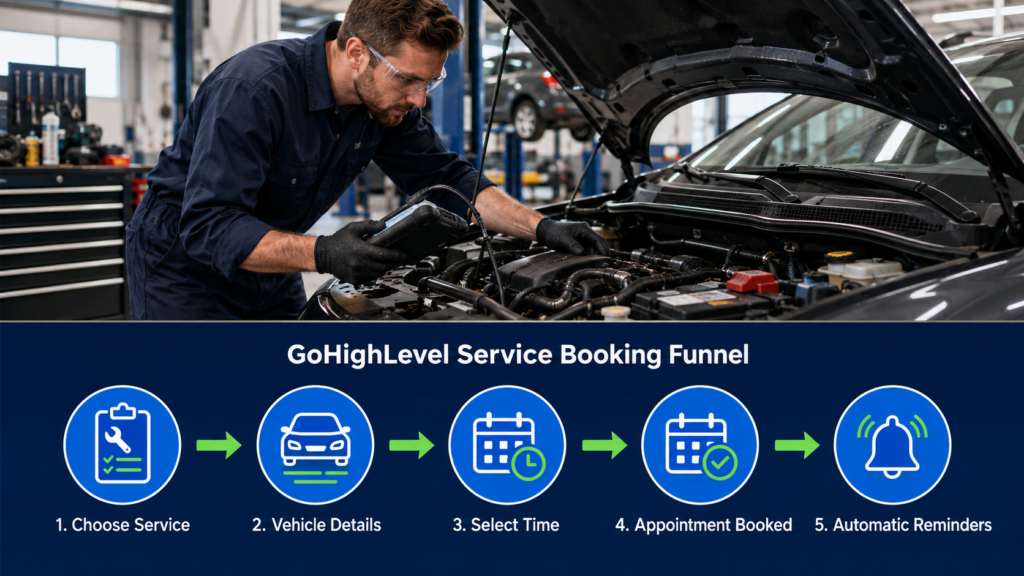
The GoHighLevel Auto Repair Service Booking Funnel Blueprint
The funnel should not be one long page containing every possible service and question. A shorter multi-stage experience makes the process easier to understand, especially on a mobile phone.
| Funnel Stage | Customer Action | Information Captured | GoHighLevel Component |
|---|---|---|---|
| Service selection | Chooses a service or describes a problem | Primary reason for the visit | Landing page or service menu |
| Vehicle intake | Provides vehicle and symptom details | Year, make, model, mileage, and concern | Form or survey |
| Appointment selection | Chooses an available time | Date, time, service, and staff assignment | Service calendar |
| Confirmation | Reviews arrival instructions | Booking status and communication preference | Confirmation page and workflow |
| Pre-visit follow-up | Confirms, cancels, or reschedules | Updated appointment status | Email and SMS automation |
| Post-service follow-up | Receives care instructions or review request | Customer feedback and future service needs | Workflow and reputation tools |
This structure can be adjusted for your shop. A small independent repair shop may use one diagnostic calendar, while a larger operation may offer separate booking paths for maintenance, tires, brakes, diagnostics, and air-conditioning service.
Important distinction: The booked time may represent vehicle check-in rather than the exact time a technician begins or completes the repair. State this clearly on the service page and confirmation screen.
Start With the Services Customers Actually Understand
Drivers do not always know which component has failed. A customer may recognize a grinding noise or warning light without knowing whether the cause involves the brakes, wheel bearing, sensor, or another system.
Your service menu should therefore combine familiar maintenance options with symptom-based choices.
Services That Can Usually Be Named Directly
- Oil change and routine maintenance
- Tire rotation
- Wheel alignment check
- Battery test or replacement
- State inspection when applicable
- Air-conditioning performance check
- Brake inspection
- Pre-purchase vehicle inspection
Symptoms That Need a Diagnostic Appointment
- Check-engine light
- Vehicle will not start consistently
- Unusual noise or vibration
- Fluid leak
- Overheating concern
- Reduced power or poor acceleration
- Steering or handling concern
- Unknown electrical problem
Use plain language throughout the funnel. “My car makes a noise when braking” is easier for a driver to select than a technical label that assumes the cause has already been identified.
Each service description should also explain what the appointment includes. A brake inspection is not the same as a completed brake repair, and a diagnostic appointment may not include the cost of additional parts or labor.
Design the First Screen for Mobile Customers
The first screen should immediately show that the customer is in the right place. Include the shop name, location, booking promise, service choices, and one primary action.
A strong headline might say:
Need Auto Repair? Tell us what your vehicle needs and choose an available service appointment online.
Under the headline, show a short list of reasons to continue:
- Choose from available appointment times
- Tell the shop about your vehicle before arriving
- Receive immediate booking instructions
- Reschedule online if your plans change
Do not begin with a lengthy history of the repair shop. Customers who are ready to book need the service-selection button, not several paragraphs of company background.
Trust information can appear near the booking action. Use relevant details such as years in business, technician certifications, warranty information, or verified customer reviews without allowing those elements to overwhelm the page.
Build a connected booking experience: GoHighLevel combines landing pages, forms, service calendars, CRM records, email, SMS, and appointment workflows. Start your GoHighLevel free trial.
Collect Vehicle Details Without Creating Form Fatigue
The intake form should help the service advisor prepare for the appointment. It should not feel like the customer is completing an entire repair order from a phone.
Collect the essentials first:
- Customer name
- Mobile phone number
- Email address
- Vehicle year
- Vehicle make
- Vehicle model
- Approximate mileage
- Reason for the visit
- Customer description of the problem
- Wait or drop-off preference
The vehicle identification number can be useful, but many drivers will not have it readily available. Unless the VIN is essential for the initial booking, request it later or make it optional.
Use conditional questions to keep the form short. A customer selecting an oil change does not need the same symptom questions as someone reporting an intermittent starting problem.
Questions for a Diagnostic Appointment
When the customer selects “I am not sure what is wrong,” display a few focused questions:
- When did the problem begin?
- Is the problem constant or intermittent?
- Are any dashboard warning lights visible?
- Does the vehicle start and drive?
- Have you noticed smoke, overheating, or a major fluid leak?
If the answers suggest the vehicle may be unsafe, display instructions to contact the shop or an appropriate towing service. Do not encourage someone to drive a vehicle that may be unsafe merely to keep the online booking moving forward.

Make Calendar Availability Match the Repair Shop
An empty calendar slot does not necessarily mean the shop can accept every type of repair. Availability can depend on technicians, service advisors, bays, lifts, diagnostic tools, alignment equipment, and the number of vehicles already waiting for work.
Create booking rules around actual operational capacity.
| Booking Constraint | Risk if Ignored | Recommended Funnel Rule |
|---|---|---|
| Technician skill | Service assigned to the wrong employee | Limit each service to qualified staff |
| Lift or bay availability | More vehicles arrive than the shop can handle | Use resource limits or intake capacity |
| Service duration | Appointments overlap throughout the day | Use realistic durations and buffers |
| Parts availability | Customer expects immediate repair | Book inspection first when parts are unknown |
| Same-day requests | Customer arrives without staff preparation | Require sufficient scheduling notice |
| Multiple concerns | Short appointment cannot cover every issue | Extend duration or require manual review |
HighLevel service calendars can organize multiple services, assign staff, set durations, configure availability, collect information, and support payments. Review the official HighLevel service calendar setup guide while configuring the options available in your account.
If your repair-management system remains the official source for technician scheduling, use the GoHighLevel calendar for customer intake and appointment requests. A service advisor can confirm the final schedule after reviewing shop capacity.
Use Two Booking Outcomes Instead of One
Not every service request should receive the same confirmation. Create separate outcomes for appointments that can be accepted immediately and requests that require staff review.
Outcome One: Appointment Confirmed
Use this path for services with predictable durations and dependable availability. The customer receives the appointment date, time, location, service selected, and arrival instructions.
Outcome Two: Request Received
Use this path for complicated symptoms, several vehicle concerns, towing situations, or services requiring additional verification. Tell the customer that the shop received the request and will confirm the appointment.
Do not display “Appointment Confirmed” simply because a form was submitted. The message shown on the confirmation page must match the appointment status stored in GoHighLevel.
This distinction reduces customer frustration. It also gives the service advisor room to clarify the request before the driver arrives.
Create a Confirmation Page That Prevents Phone Calls
A good confirmation page answers the questions customers commonly call the shop to ask after booking.
Include:
- The appointment or request status
- Selected service
- Vehicle year, make, and model
- Date and arrival time
- Shop address
- Parking or check-in instructions
- Wait or drop-off selection
- What the customer should bring
- Rescheduling and cancellation options
- A telephone number for urgent changes
If the customer is dropping off the vehicle, explain where to leave it and whether after-hours key drop is available. If the customer selected a waiting appointment, avoid promising a completion time unless the service supports that promise.
The page can also remind customers that additional repairs require inspection and authorization. This helps separate the scheduled service from work that may be recommended later.
Build Automations Around Appointment Status
The automation should change when the appointment changes. A confirmation sequence that ignores cancellations and rescheduling will send inaccurate information.
Create focused workflows for these events:
- Appointment booked: Send confirmation and notify the service advisor.
- Request pending: Create a task for staff review.
- Appointment confirmed: Start the reminder sequence.
- Appointment rescheduled: Send the updated date and time.
- Appointment canceled: Stop reminders and confirm cancellation.
- Customer no-show: Send one courteous rescheduling message.
- Service completed: Begin post-service follow-up.
The opportunity pipeline should update with these events. Staff members can then see whether the vehicle is booked, awaiting confirmation, checked in, undergoing diagnosis, awaiting authorization, or ready for pickup.
Workflow warning: Add exit conditions to every reminder sequence. Canceled, rescheduled, manually booked, and completed appointments should not continue receiving outdated messages.
Reduce No-Shows Without Over-Messaging Customers
No-show reduction begins with a clear confirmation. Customers are more likely to arrive when they know where to go, what time to arrive, and what the appointment includes.
A simple reminder schedule may include:
- Immediately after booking: Send the complete confirmation.
- One business day before: Remind the customer of the appointment and provide change options.
- Shortly before arrival: Send a brief time and location reminder when appropriate.
Include the shop name in every message. A vague reminder stating “Your appointment is tomorrow” may be confusing when the customer has scheduled several unrelated appointments.
Use the customer’s local time zone and send texts during reasonable hours. Honor opt-outs and communication preferences.
Recover Visitors Who Do Not Finish Booking
Some customers will submit the vehicle form but leave before selecting a time. Because their contact information has already been captured, you can offer a convenient way to continue.
The incomplete-booking workflow can:
- Confirm that the service request was received.
- Provide a link back to the correct calendar.
- Offer the shop telephone number.
- Ask whether the customer needs help choosing a service.
- Notify the service advisor when the concern appears urgent.
Keep this sequence short. Once the customer books by telephone, replies, schedules online, or opts out, remove the contact from the remaining messages.
Do not describe the vehicle as diagnosed or quote a repair price based only on the form response. The objective is to secure the next appropriate conversation or appointment.
Capture more after-hours service requests: GoHighLevel lets your shop collect customer and vehicle information even when the front desk is closed.
Try GoHighLevel free.
Decide Whether the Funnel Should Collect Payment
Many repair shops will not need payment during routine appointment booking. Others may collect a diagnostic fee, mobile-service deposit, or reservation payment for a specialized service.
If you enable payment collection, make the charge unmistakably clear. Explain whether it represents:
- A diagnostic fee
- A refundable or nonrefundable deposit
- A reservation charge
- Full payment for a standardized service
- An amount credited toward future authorized work
Never present a diagnostic fee as the total cost of repairing an unknown problem. Additional work should follow your shop’s estimate and authorization procedures.
Test successful payments, failed transactions, cancellations, and refunds. Confirm that both the customer and service advisor can identify the payment status associated with the appointment.
Connect the Funnel to the In-Shop Customer Experience
The online experience should make the front desk more efficient. It should not create a second disconnected system that employees must manually decipher.
When the customer arrives, the service advisor should be able to see:
- Contact information
- Vehicle details
- Requested service
- Symptoms described by the customer
- Appointment and payment status
- Previous email and SMS communication
- Lead source
- Any staff notes or requested accommodations
After check-in, move the opportunity into the appropriate service stage. Your repair-order software can remain responsible for parts, labor, technician notes, estimates, and invoices if that is the system your shop already uses.
The important point is to define ownership. GoHighLevel should not silently conflict with another calendar, customer record, or work-order process.

Turn Completed Appointments Into Repeat Business
The funnel should not end when the customer arrives. Once service is completed, start a separate follow-up workflow based on the actual work performed.
Post-service communication may include:
- A thank-you message
- Pickup or after-hours instructions
- Invoice and payment information
- Warranty or care instructions
- A short check-in after the repair
- A neutral request for an honest review
- A future maintenance reminder
Maintenance reminders should match the service and the shop’s recommendations. Avoid sending every customer the same generic reminder regardless of vehicle, mileage, or work performed.
If reputation building is part of your strategy, use the same ethical request principles described in our gohighlevel roofing contractor review automation guide. Customers should be invited to leave honest feedback without being filtered according to their expected rating.
Test the Funnel With Real-World Scenarios
Do not test only the ideal customer who books an oil change and arrives on time. The funnel must also handle uncertain symptoms, multiple concerns, schedule changes, and failed payments.
Run these test scenarios:
- A new customer books routine maintenance.
- An existing customer submits a diagnostic concern.
- A driver reports an unsafe vehicle condition.
- A customer requests several unrelated services.
- A visitor completes the form but abandons the calendar.
- A customer books and later reschedules.
- A customer cancels after receiving the first reminder.
- A service advisor books the appointment by telephone.
- A payment succeeds.
- A payment fails or is abandoned.
- A customer is marked as a no-show.
- A completed appointment enters post-service follow-up.
Inspect the contact record, opportunity, calendar, internal alerts, email, and SMS after each test. Confirm that the customer receives only messages appropriate to the current status.
Measure More Than the Number of Bookings
A large number of online appointments does not automatically mean the funnel is working. The bookings must represent services the shop can handle and customers who actually arrive.
Track these performance indicators:
- Landing page visitors
- Service-selection clicks
- Vehicle forms completed
- Calendar bookings completed
- Forms abandoned before scheduling
- Requests requiring manual review
- Confirmed appointments
- Rescheduled appointments
- No-show rate
- Appointments that become completed services
- Average time from form submission to booking
- Bookings by traffic source
Look for operational problems as well as marketing problems. If customers repeatedly choose a time that the shop cannot honor, the calendar configuration needs attention even if its conversion rate appears strong.
A Practical Launch Plan for Your Repair Shop
Do not begin by publishing every service the shop offers. Launch with a controlled group of appointment types that have predictable durations and clear staffing requirements.
A sensible first version might include:
- Oil change and routine maintenance
- Brake inspection
- Battery testing
- Check-engine-light diagnosis
- Air-conditioning inspection
- General vehicle concern
Monitor how customers describe their needs and which bookings require staff corrections. Use that information to improve service labels, form questions, appointment durations, and confirmation instructions.
Once the first group is stable, add more services, calendar resources, conditional questions, payments, and follow-up campaigns. Expansion should solve observed problems rather than add features merely because they are available.
Ready to build your booking funnel? Use GoHighLevel to connect your repair shop’s landing pages, service calendar, vehicle intake, appointment reminders, pipeline, and customer follow-up.
Start your GoHighLevel free trial today.
Final Takeaway
Your booking funnel should make life easier for both the driver and the service advisor. Begin with customer-friendly service choices, collect only useful vehicle information, display availability based on real shop capacity, and make every confirmation status accurate. When those pieces work together, your GoHighLevel auto repair service booking funnel can reduce unnecessary calls, recover unfinished bookings, lower no-shows, and create a more organized path from online search to completed service.