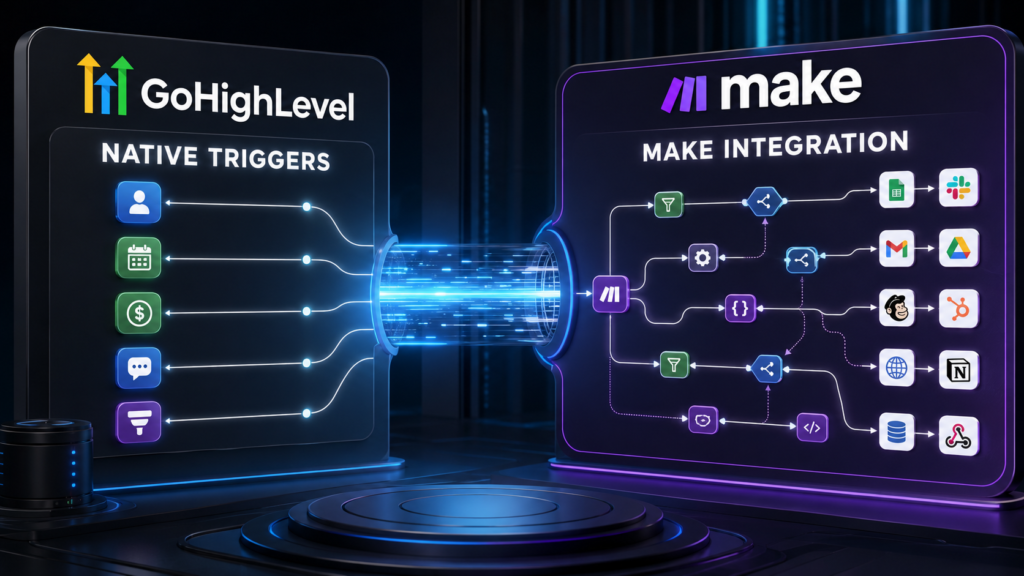
Automation architecture comparison
GoHighLevel Native Triggers vs Make Integration: When Should You Keep Automation Inside the CRM?
GoHighLevel native triggers vs Make integration is not a contest between a simple tool and an advanced one. It is a decision about where automation should live. HighLevel’s native triggers respond directly to events in its CRM, calendars, conversations, payments, funnels, courses, communities, and other platform features. Make operates as a visual orchestration layer that moves and transforms data among thousands of external applications.
A native trigger usually creates fewer connections, less data mapping, and a shorter failure path. A Make scenario becomes more valuable when the process spans several systems, needs sophisticated routing, handles arrays or files, or requires data transformation that is easier to understand visually.
Quick verdict: Use GoHighLevel native triggers for high-volume customer activity that begins and ends inside HighLevel. Add Make when the business process must coordinate several external applications or requires branching, iteration, aggregation, transformation, and API control beyond the native workflow.
[rank_math_toc]

This guide is part of our GoHighLevel software comparisons and alternatives silo. Pricing and features were checked in August 2026 and may change.
GoHighLevel Native Triggers vs Make Integration at a Glance
| Decision Area | GoHighLevel Native Triggers | Make Integration | Practical Advantage |
|---|---|---|---|
| Primary purpose | Automate events and records within the HighLevel operating platform | Orchestrate data and actions across independent applications | Depends on system boundaries |
| Setup speed | Fast when trigger, data, and actions are native | Requires connections, modules, mappings, and scenario testing | GoHighLevel |
| Visual data control | Linear workflows with branches, waits, goals, and native actions | Visual scenarios with routers, filters, iterators, aggregators, variables, and transformations | Make |
| CRM context | Direct access to contacts, opportunities, appointments, conversations, payments, and more | CRM context must be retrieved and mapped through modules or API requests | GoHighLevel |
| External applications | Native integrations, premium actions, marketplace apps, webhooks, and APIs | More than 3,000 standard apps plus custom apps and API tools | Make |
| Failure points | Fewer for native processes | More connections, mappings, rate limits, and external dependencies | GoHighLevel for native work |
| Complex transformations | Useful native formatting, arrays, math, conditions, and workflow logic | More flexible visual manipulation of complex payloads and collections | Make |
| Best fit | Lead conversion, appointment, messaging, pipeline, payment, and client automation | Cross-department processes, databases, ecommerce, accounting, files, and complex APIs | Business-process dependent |
The Three-Layer Automation Architecture
The cleanest way to decide where an automation belongs is to separate the technology into three layers.
If HighLevel is both the system of record and the destination, moving the event through Make often adds an unnecessary middle layer. If HighLevel is only one of several systems, Make can become the orchestration layer that keeps them synchronized.
Architecture rule: Keep the automation as close as practical to the authoritative data. Add an integration layer when crossing a real system boundary—not simply because another automation tool is available.
What Counts as a GoHighLevel Native Trigger?
A workflow trigger is the event that enrolls a record or starts an automated process. HighLevel maintains a large and growing collection of triggers tied to activity inside the platform. Examples include:
- Form or survey submitted
- Contact created, changed, tagged, or reassigned
- Opportunity created or moved to a pipeline stage
- Appointment booked, canceled, rescheduled, or marked as a no-show
- Customer replied or message status changed
- Payment received, invoice activity, subscription events, or order fulfillment
- Course, community, or membership activity
- Review, affiliate, ecommerce, and marketing events
- Scheduled or recurring contactless workflow execution
Because the event originates inside HighLevel, the workflow can immediately use the associated contact, opportunity, appointment, conversation, or payment information. There is no separate polling schedule or external field-mapping step for the native event.
What Make Adds to a HighLevel Integration
Make calls an automated workflow a scenario. A scenario contains modules representing triggers, searches, actions, transformations, and control tools. The visual canvas makes it easier to inspect how data moves through complex processes.
Make is especially useful for:
- Routers and filters: Send data down several conditional paths.
- Iterators: Split a collection into individual bundles for processing.
- Aggregators: Combine multiple bundles into an array, report, or summarized payload.
- Data transformation: Reformat dates, text, JSON, numbers, files, and arrays.
- Search and synchronization: Find existing records before creating or updating them.
- API work: Use HTTP modules, custom apps, webhooks, and Make’s API.
- Cross-app coordination: Connect HighLevel with databases, accounting, project management, ecommerce, support, and productivity software.
This power creates a new responsibility: the scenario owner must understand bundles, field types, connections, error handling, rate limits, credit use, and the consequences of partial execution.
Pricing: HighLevel Workflows vs Make Credits
| Plan or Usage Layer | Published Price | Included Capacity | Important Limit |
|---|---|---|---|
| Make Free | $0 | 1,000 credits monthly, visual builder, routers and filters | Two active scenarios and 15-minute minimum schedule interval |
| Make Core | $12/month for 10,000 credits | Unlimited active scenarios, one-minute schedules, API access | Credits and usage allowances scale with selected volume |
| Make Pro | $21/month for 10,000 credits | Priority execution, custom variables, full-text log search | Complex modules and AI can consume credits differently |
| Make Teams | $38/month for 10,000 credits | Team roles and shared scenario templates | Governance needs may push larger organizations to Enterprise |
| HighLevel Starter | $97/month or $970/year | Three sub-accounts, unlimited contacts and users, core workflows | Premium actions, messages, calls, AI, and optional products may cost extra |
| HighLevel Unlimited | $297/month or $2,970/year | Unlimited sub-accounts and basic API access | Agency usage remains billable where applicable |
Make’s published prices above use 10,000 credits per month. Higher credit volumes change the price. Make states that most module actions use one credit, while some advanced features—particularly AI and code—can use more. Reading, searching, creating, updating, deleting, transforming, aggregating, and iterating data may all consume credits.
HighLevel’s standard workflow actions do not count against a general Make-style credit allowance. Designated premium triggers, actions, marketplace apps, and LC apps can consume premium executions. HighLevel currently publishes $0.01 per execution after 100 free lifetime executions per sub-account, or Workflow Pro bundles beginning at $10 monthly.
Credits and premium executions are not equivalent units. Make can charge credits for many modules within a scenario. HighLevel charges premium executions only for designated premium features; standard native workflow actions are excluded from the premium-execution allowance.
How Scenario Complexity Changes Make Credit Usage
A Make scenario may look like one automation but consume several credits for each processed item. Consider a scenario that receives a HighLevel webhook, searches an accounting system, creates a customer, adds an invoice, updates a project database, and sends a chat notification. If all six counted modules run for 500 customers, the process can use roughly 3,000 credits before considering iterators, repeated searches, errors, or advanced features.
Illustrative Make Credit Growth
250 records × 4 modules = 1,000 credits
500 records × 6 modules = 3,000 credits
1,000 records × 8 modules = 8,000 credits
1,000 records × 10 modules = 10,000 credits
Illustrative estimates only. Actual credit use depends on modules, bundles, routes, advanced features, errors, and Make’s current billing rules.
Five Architecture Tests
Test 1: Appointment Reminder and No-Show Follow-Up
A prospect books a HighLevel calendar. The business sends confirmation email and SMS, waits until the appointment, and follows up differently if the appointment is completed or marked as a no-show.
Use native HighLevel triggers. The calendar, contact, messages, and appointment status all live in the same platform. Make would add a connection without providing an essential new capability.
Test 2: Closed Opportunity Creates an Accounting Project
When a HighLevel opportunity becomes “Won,” the business must create a customer in accounting, open a project in its delivery system, create a cloud folder, and send a structured handoff to a team channel.
Use a hybrid design. Let the native HighLevel stage change begin the process, then send one controlled webhook to Make. Make can orchestrate the external systems, handle searches, transform data, and return important identifiers to HighLevel.
Test 3: Ecommerce Order With Multiple Line Items
Each order contains an array of products. The process must iterate through line items, check inventory, route products by vendor, aggregate fulfillment results, and update the customer.
Make is likely stronger. Iterators, aggregators, routers, and visual bundle inspection make this cross-system process easier to design than forcing all logic into a CRM workflow.
Test 4: Lead Enters a Sales Pipeline
A form submission creates a contact, applies tags, assigns an owner, creates an opportunity, sends an internal alert, starts nurture messages, and stops follow-up when the lead replies.
Use native HighLevel triggers and actions. The data and actions belong to HighLevel’s core sales process. Keeping the workflow native reduces latency, mappings, and external failure points.
Test 5: Nightly Data Reconciliation
Every night, the business compares thousands of records among HighLevel, an ERP, a data warehouse, and billing software, then produces an exception report.
Use Make or a more specialized data-integration system. The requirement centers on cross-system reconciliation rather than a customer event inside HighLevel. Check volume, rate limits, execution time, and governance before choosing the final platform.
Native Does Not Always Mean Free
HighLevel increasingly offers native workflow integrations for outside applications such as Google Contacts, Basecamp, Calendly, Monday.com, HubSpot, and AI providers. “Native” can describe where the trigger or action appears, but it does not guarantee that every execution is included at no extra charge.
Some external app actions are premium, some marketplace apps set separate prices, and AI actions can incur model or token charges. Review the label and pricing for every action before moving a high-volume scenario from Make.
Reliability: Fewer Connections vs Better Error Tools
Native workflows generally have a shorter dependency chain. There are fewer authentication tokens, fewer external mappings, and less chance that one vendor changes a field or endpoint. This simplicity can improve reliability for ordinary CRM processes.
Make provides detailed visual execution history, incomplete executions, error handlers, route-level inspection, and the ability to see data bundles as they move through modules. For complex integrations, these tools can make failures easier to isolate than a single opaque webhook.
The best reliability design minimizes unnecessary platforms while preserving enough observability to diagnose inevitable errors.
Security and Data Governance Questions
- Which platform stores the authoritative customer record?
- Does the scenario transmit sensitive data that does not need to leave HighLevel?
- Who owns the Make organization, app connections, and API credentials?
- Can contractors view production payloads or execution logs?
- How long are logs and incomplete executions retained?
- Which app connection should be rotated when an employee leaves?
- Are data regions, contracts, permissions, and compliance controls sufficient?
- Can the business reconstruct the automation from documentation?
When GoHighLevel Native Triggers Are Better
- The initiating event and most actions occur inside HighLevel.
- The workflow handles contacts, pipelines, calendars, conversations, payments, courses, or communities.
- High volume would unnecessarily consume Make credits.
- The team wants fewer credentials, mappings, and integration failure points.
- An agency needs reusable workflows across many sub-accounts.
- Speed of implementation matters more than advanced transformation.
When Make Integration Is Better
- The process spans several independent business applications.
- Data requires iteration, aggregation, complex transformation, or multiple routes.
- Teams need visual inspection of bundles and cross-app execution history.
- The workflow uses an app or API not sufficiently supported inside HighLevel.
- HighLevel is one participant rather than the central system of record.
- The business needs custom apps, enterprise integrations, or advanced scenario control.
The Recommended Hybrid Pattern
A strong hybrid design divides responsibility clearly:
- HighLevel detects the customer event. Use the native form, appointment, pipeline, payment, message, or community trigger.
- HighLevel completes native actions first. Update the contact, create the opportunity, apply tags, or send immediate communication.
- One webhook hands off external work. Send a controlled payload with a unique event identifier.
- Make orchestrates outside systems. Search, route, transform, iterate, aggregate, and update external applications.
- Make returns essential results. Write external IDs, fulfillment status, or exceptions back to HighLevel.
- Both sides log the same identifier. This makes duplicate prevention and troubleshooting easier.
For another usage-based connector comparison, read gohighlevel workflows vs zapier pricing.
Migration and Refactoring Checklist
- Inventory every scenario, module, route, connection, webhook, schedule, and data store.
- Mark actions that now have reliable native HighLevel equivalents.
- Calculate monthly Make credits by scenario and module.
- Separate native CRM work from genuine cross-system orchestration.
- Add unique event IDs and duplicate-prevention rules.
- Document field mappings, default values, time zones, and data types.
- Test missing fields, API errors, rate limits, timeouts, and replay behavior.
- Run old and new paths in parallel for critical integrations when practical.
- Disable the old automation only after output counts reconcile.
Test Native HighLevel Automation First
Build one real CRM workflow during the trial, then add an external integration only where the native process reaches a genuine system boundary.
Start a 14-Day GoHighLevel Trial
Affiliate disclosure: Local Resource Hub may earn a commission if you purchase through this link, at no additional cost to you.
Frequently Asked Questions
Can GoHighLevel integrate with Make?
Yes. HighLevel and Make can exchange data through supported app modules, webhooks, and API requests. The exact method depends on the trigger, action, authentication, and data required.
Are GoHighLevel native triggers better than Make?
Native triggers are generally better when the event and resulting actions occur inside HighLevel. Make is better when the process spans several external systems or requires advanced routing and data transformation.
How much does Make cost?
Make currently lists Free with 1,000 monthly credits, Core at $12 monthly for 10,000 credits, Pro at $21, Teams at $38, and custom Enterprise pricing. Prices vary with credit volume and billing terms.
What is a Make credit?
Make uses credits as its billing unit. Most module actions use one credit, while certain advanced AI and code features can use more. Reading, searching, creating, updating, transforming, aggregating, and iterating data may consume credits.
Do HighLevel native workflow actions cost extra?
Standard HighLevel workflow actions are part of the platform subscription. Designated premium triggers and actions, marketplace apps, AI, email, SMS, telephone, and other usage-based services can cost extra.
Can Make replace GoHighLevel workflows?
Make can coordinate many actions involving HighLevel and external systems, but it does not replace HighLevel’s CRM, calendars, conversations, pipelines, funnels, courses, or communities. Moving every native action into Make can increase credit use and complexity.
Should I use Make or Zapier with GoHighLevel?
Make is often attractive for visual branching, iteration, aggregation, and complex data transformation. Zapier is often easier for straightforward app-to-app automation. Compare app support, usage accounting, governance, error handling, and team skill.
What is the safest hybrid design?
Let HighLevel detect and process native CRM events, then send one controlled webhook to Make for external orchestration. Return only essential results and use a shared unique identifier for logging and duplicate prevention.
Final Verdict on GoHighLevel Native Triggers vs Make Integration
GoHighLevel native triggers win for proximity, simplicity, and CRM context. They reduce mappings and external dependencies when the business event already lives in HighLevel.
Make wins for cross-system orchestration. Its visual scenarios, routers, filters, iterators, aggregators, transformations, app ecosystem, and API capabilities are valuable when the process genuinely crosses several software boundaries.
The best answer to GoHighLevel native triggers vs Make integration is usually an architectural boundary: keep customer-facing sales activity native, use Make for external coordination, and avoid paying for or maintaining integration steps that do not add real capability.
Sources and Pricing Notes
Current details were checked against the official Make pricing page, HighLevel workflow-action documentation, HighLevel pricing page, and HighLevel pricing and billing guide. Prices, credits, execution rules, and features can change.